The Three Executables: utlx, utlxd, and utlxe
UTL-X is one language, but it ships as three separate executables. Each is built for a different stage of the development and deployment lifecycle. Understanding which to use — and when — is essential before diving into the language itself.
One Language, Three Runtimes
All three executables share the same core:
The same ANTLR-based parser (identical grammar, identical AST)
The same interpreter (identical expression evaluation)
The same Universal Data Model (identical type system)
The same 650+ standard library functions
The same 11 format parsers and serializers
The same 7 schema validators
A transformation that works in one executable works identically in all three. A bug fix in the shared core fixes all three simultaneously. This is by design — the conformance suite (500+ tests) validates behavior across executables.
The difference is in what surrounds the core: how input arrives, how output is delivered, and how the process is managed.
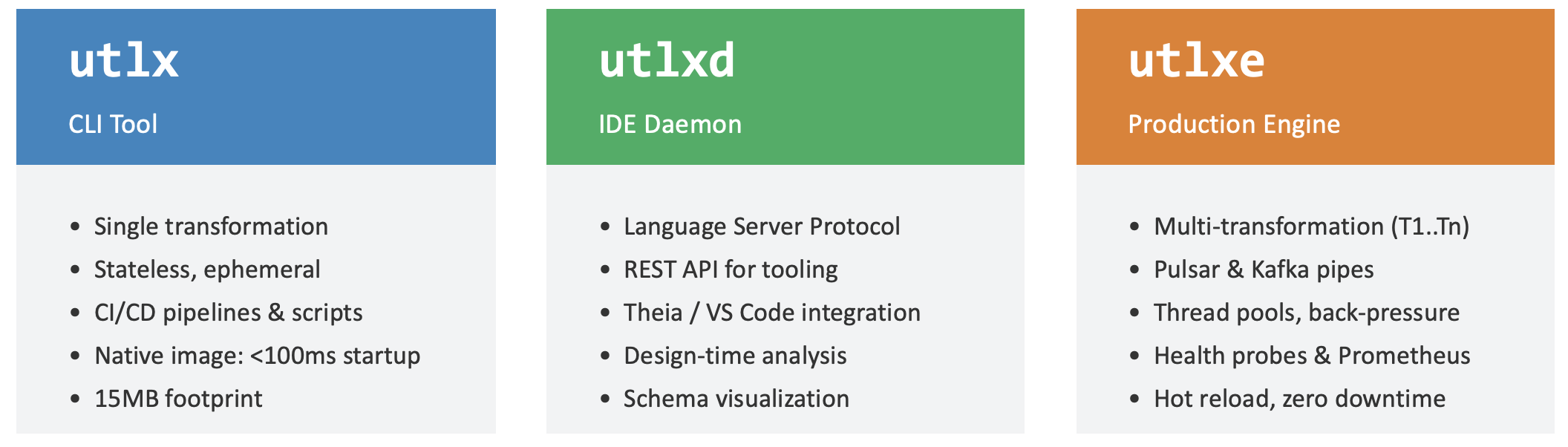
The three UTL-X executables — utlx (CLI tool), utlxd (IDE daemon), and utlxe (production engine). All share the same core; each targets a different use case.
utlx — The CLI
The command-line interface is for developers. It's the tool you install on your laptop, use in shell scripts, and run in CI/CD pipelines.
Lifecycle: single invocation. You run a command, it processes data, it exits. No persistent process, no state between runs.
Distribution: native binary (GraalVM) via Homebrew, Chocolatey, or direct download. Also available as a JVM JAR for development.
Key characteristics:
| Startup time | < 10ms (native), 250ms (JVM) |
| Memory | 40 MB (native), 150 MB (JVM) |
| Workers | 1 (single-threaded) |
| Protocol | stdin / stdout / files |
| Strategies | TEMPLATE only |
| Hot reload | No — each run is independent |
| Metrics | None |
| Best for | Development, scripting, CI/CD, one-off conversions |
Modes:
Transform:
utlx transform script.utlx input.xml— run a .utlx file against input dataExpression:
echo data | utlx -e '.name' -r— inline one-liner, jq-styleIdentity (flip):
cat data.xml | utlx— auto-detect format, convert to the complementREPL:
utlx repl— interactive mode for experimentationValidate:
utlx validate script.utlx— check syntax without runningFunctions:
utlx functions --search date— browse the standard library
The CLI is covered in depth in Chapter 5.
utlxd — The Daemon
The daemon is the bridge between UTL-X and your IDE. It runs as a background process on your development machine, communicating with the VS Code extension via the Language Server Protocol (LSP).
Lifecycle: long-running. Starts when VS Code opens a .utlx file, stops when VS Code closes. Keeps the parsed state of your transformations in memory for instant feedback.
Distribution: JVM JAR only. The daemon needs full Kotlin reflection for language features like autocompletion and type inference — GraalVM native image doesn't support this yet.
Key characteristics:
| Startup time | 1 second |
| Memory | 200 MB |
| Workers | 1 (serves one IDE session) |
| Protocol | LSP over stdio |
| Strategies | TEMPLATE only |
| Hot reload | Yes — re-parses on every keystroke |
| Metrics | None |
| Best for | VS Code extension, IDE integration |
Features provided to the IDE:
Real-time diagnostics: syntax errors highlighted as you type — no need to save and run
Autocompletion: function names (all 650+), property paths (from parsed input), keywords
Hover information: function signatures, parameter types, return types
Live preview: transformation result updates as you type (with sample data)
Go-to-definition: navigate to function definitions and variable bindings
Format document: auto-indent and style your .utlx file
The daemon is not used in production — it's a developer tool. You never deploy utlxd to a server. The IDE chapter (Chapter 7) covers it in detail.
utlxe — The Engine
The engine is for production. It's a long-running transformation service that accepts messages via HTTP, gRPC, or message brokers, transforms them at high throughput, and returns results.
Lifecycle: long-running. Starts with the container, runs indefinitely. Transformations are loaded at startup or hot-reloaded via API.
Distribution: Docker image (ghcr.io/utlx-lang/utlxe). Available on Azure Marketplace as a managed application.
Key characteristics:
| Startup time | 3 seconds (JVM) |
| Memory | 512 MB – 8 GB (configurable) |
| Workers | 8–128 concurrent threads |
| Protocol | HTTP REST (8085), gRPC, stdio-proto, stdio-json |
| Strategies | TEMPLATE, COPY, COMPILED, AUTO |
| Hot reload | Yes — load/update/unload via HTTP API |
| Metrics | Prometheus (port 8081) |
| Best for | Cloud deployment, Azure/GCP/AWS Marketplace |
Transport modes:
--mode http— HTTP REST API on port 8085. The primary mode for cloud deployment. Endpoints:/api/transform,/api/load,/api/execute/\{id\},/api/health--mode grpc— gRPC service for low-latency, binary protocol communication--mode stdio-proto— protobuf over stdin/stdout, used by the C# and Go wrappers--mode stdio-json— line-delimited JSON over stdin/stdout, for backward compatibility
Execution strategies:
The engine offers four strategies that trade initialization time for runtime performance:
| Strategy | Init time | Runtime | Best for |
| TEMPLATE | Instant | Interprets AST | Development, simple transforms |
| COPY | Fast (build skeleton) | Clone + fill | Schema-driven, predictable structure |
| COMPILED | Seconds at startup (one-time, before ready) | JVM bytecode | Maximum throughput, complex logic |
| COPY + COMPILED | Seconds at startup (one-time, before ready) | Clone skeleton + JVM bytecode | Ultimate throughput: pre-built structure + compiled logic |
| AUTO | Depends | Depends | Production default (schema → COPY, else → TEMPLATE) |
COPY + COMPILED is not a separate strategy: value — it is what COPY does automatically: when you select COPY (or AUTO chooses it), the engine also compiles the fill logic to bytecode where it can, combining the pre-built skeleton with compiled expressions for the fastest path.
COMPILED strategy compiles UTL-X expressions to JVM bytecode using the ASM library — the same technology that Java itself uses. This achieves throughput of 86,000+ messages per second on a single instance with 8 workers. Chapter 32 covers the engine lifecycle (design-time, init-time, runtime) and Chapter 36 covers performance tuning.
Cloud deployment:
UTLXe is designed for containerized environments:
Azure Container Apps — available on Azure Marketplace (Starter $35/month, Professional $105/month)
GCP Cloud Run — Terraform module included, $44/month
AWS ECS/Fargate — CloudFormation template, $44/month
Any Kubernetes cluster — Docker image from
ghcr.io
Chapter 33 covers cloud deployment in detail.
Comparison at a Glance
| Aspect | utlx (CLI) | utlxd (Daemon) | utlxe (Engine) |
| Purpose | Development | IDE integration | Production |
| Lifecycle | Single run | Long-running | Long-running |
| Runtime | Native or JVM | JVM only | JVM (Docker) |
| Startup | < 10ms | 1s | 3s |
| Workers | 1 | 1 | 8–128 |
| Protocol | stdin/stdout | LSP | HTTP / gRPC / proto |
| Strategies | TEMPLATE | TEMPLATE | All four |
| Hot reload | No | Yes (LSP) | Yes (API) |
| Metrics | None | None | Prometheus |
| Distribution | brew / choco | VS Code ext | Docker / Marketplace |
| Branch | main | development | development |
The Wrapper Pattern
What if your application is written in C#, Go, or Python — not Kotlin/JVM? You don't need to rewrite UTL-X. Instead, you use a wrapper library that spawns UTLXe as a subprocess and communicates via protobuf:
The wrapper is 200–300 lines of thin client code. The engine — 100,000+ lines of transformation logic — exists once. All languages get identical behavior, verified by the same 500+ conformance tests.
Available wrappers:
| Language | Status | Use case |
| C# / .NET | Built | Azure Functions, ASP.NET, console apps |
| Go | Built | Open-M controller, Go microservices |
| Python | Planned | Data science, Django/Flask, AWS Lambda |
| Java / Kotlin | Native (no wrapper) | Direct API — UTLXe IS JVM |
Chapter 34 covers SDKs and wrappers in detail.
When to Use Which
| I want to... | Use |
| Write a transformation | utlxd (VS Code) + utlx (to test) |
| Convert a file quickly | utlx (identity mode or -e) |
| Process files in a shell script | utlx (native binary) |
| Validate syntax in CI/CD | utlx validate |
| Deploy a transformation API | utlxe –mode http |
| Connect to Azure Service Bus | utlxe + Dapr sidecar |
| Embed in a C# application | utlxe via C# wrapper |
| Embed in a Go service | utlxe via Go wrapper |
| Run performance benchmarks | utlxe –mode http with load testing |
The typical developer workflow: write in VS Code (utlxd), test on the command line (utlx), deploy to production (utlxe). Same .utlx file at every stage.