Case Studies and Recipes
This chapter presents real-world integration scenarios and reusable transformation recipes. Each case study shows the architecture, the transformation code, and the results. The recipes are standalone patterns you can copy and adapt.
Case Study 1: European E-Invoicing (Peppol / UBL)
Scenario: A Dutch wholesale distributor (200 employees, 850 B2B customers) must comply with EU Directive 2014/55 — all B2G invoices in UBL 2.1 XML via the Peppol network.
Source: Dynamics 365 Business Central (OData JSON). Target: UBL 2.1 XML, delivered via Peppol BIS 3.0 Access Point.
Architecture:
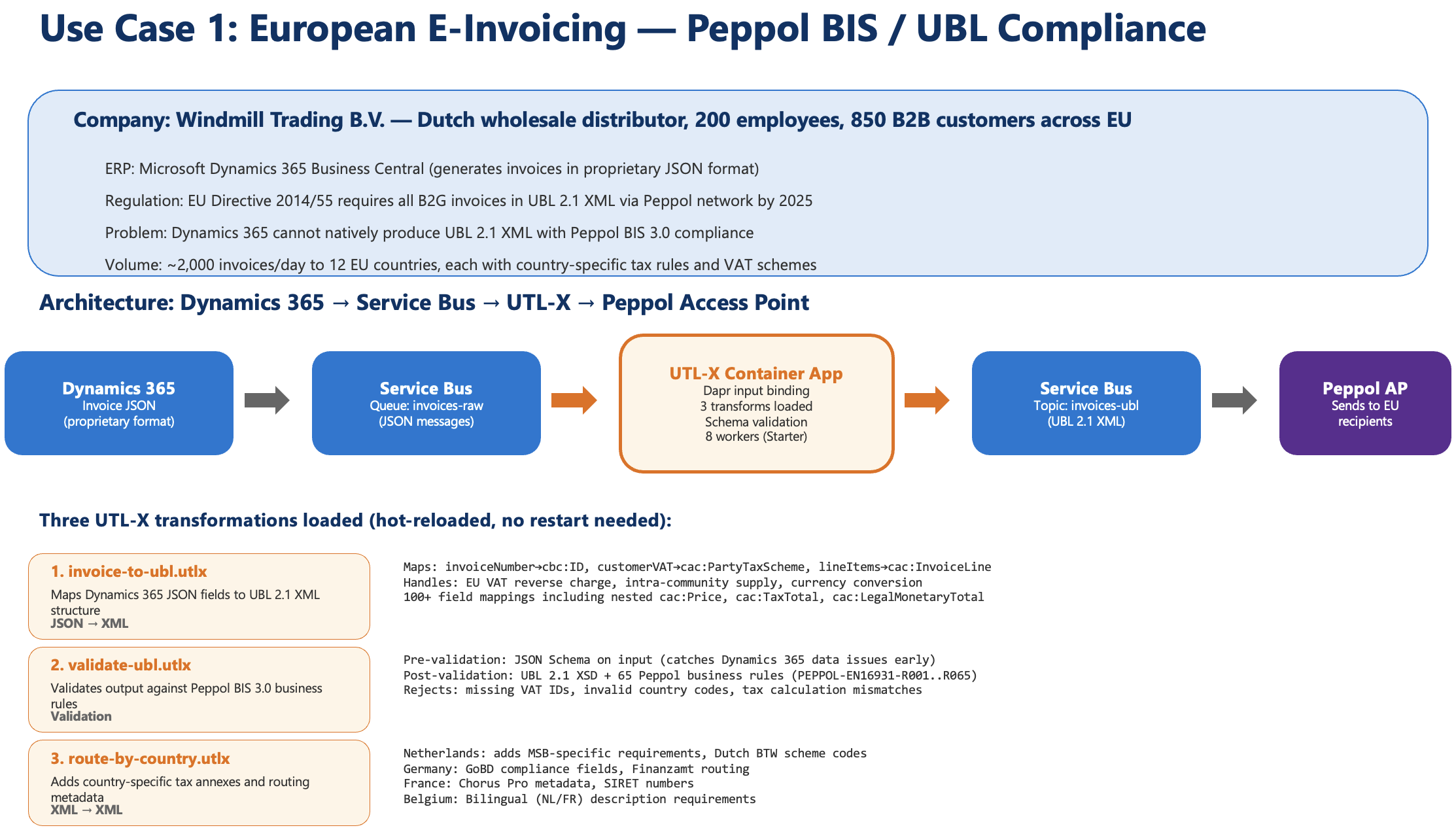
Use Case 1 — Dynamics 365 → Service Bus → UTL-X Container App → Peppol Access Point. Three hot-reloadable transformations handle invoice mapping, validation, and country-specific routing.
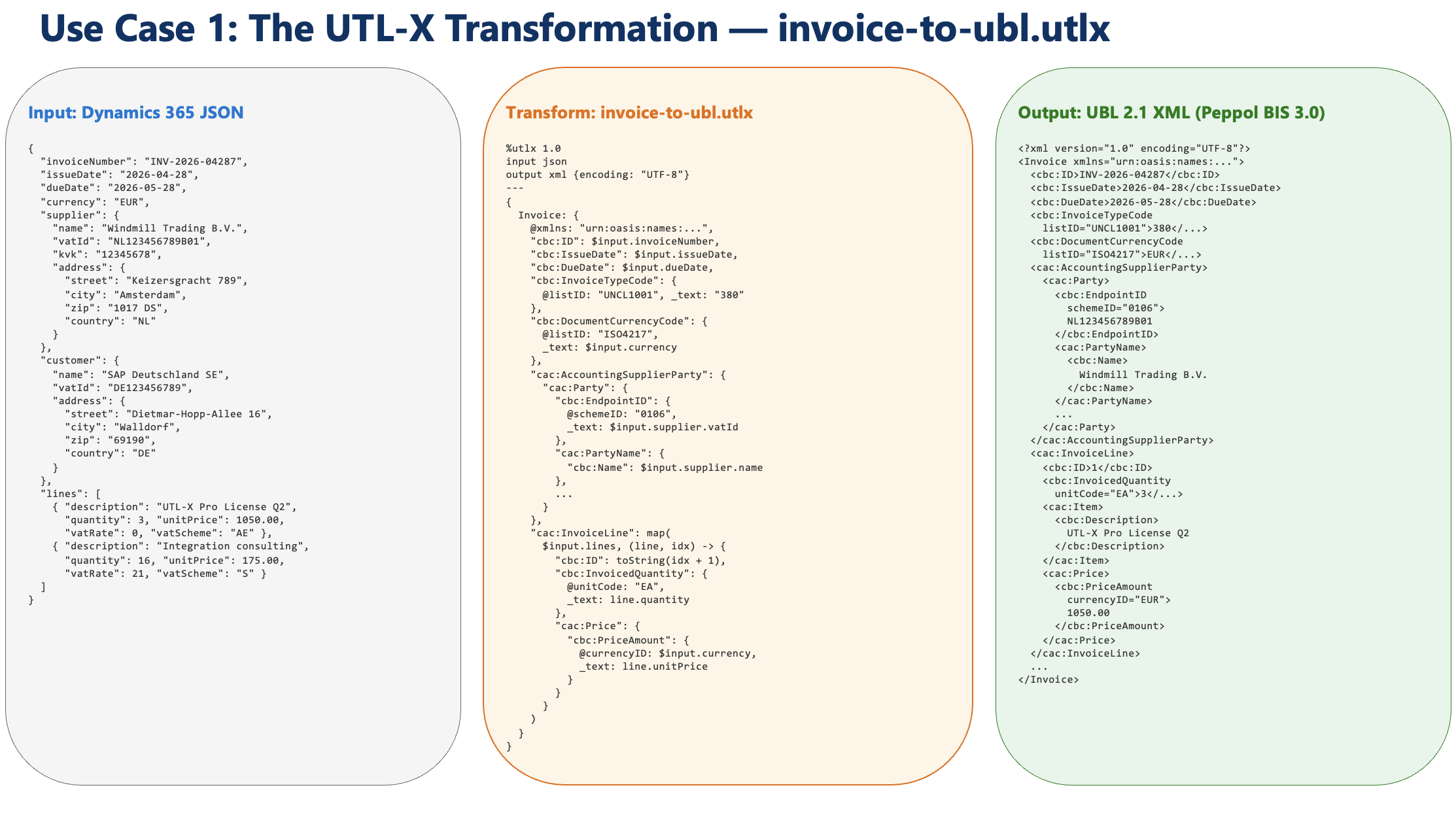
Use Case 1 — The UTL-X transformation in detail: Dynamics 365 JSON input (left), invoice-to-ubl.utlx transformation (center), UBL 2.1 XML output (right).
Transformation highlights:
%utlx 1.0
input odata
output xml
---
let inv = $input

function VATCategory(countryCode) {
  if (countryCode == "NL") "S"
  else if (contains(["BE", "DE", "FR", "IT", "ES"], countryCode)) "S"
  else "O"
}

function FormatAmount(amount, currency) {
  {"@currencyID": currency, "_text": toString(round(amount * 100) / 100)}
}

{
  "Invoice": {
    "@xmlns": "urn:oasis:names:specification:ubl:schema:xsd:Invoice-2",
    "@xmlns:cbc": "urn:oasis:names:specification:ubl:schema:xsd:CommonBasicComponents-2",
    "@xmlns:cac": "urn:oasis:names:specification:ubl:schema:xsd:CommonAggregateComponents-2",

    "cbc:CustomizationID": "urn:cen.eu:en16931:2017#compliant#urn:fdc:peppol.eu:2017:poacc:billing:3.0",
    "cbc:ID": inv.invoicenumber,
    "cbc:IssueDate": formatDate(now(), "yyyy-MM-dd"),
    "cbc:InvoiceTypeCode": "380",
    "cbc:DocumentCurrencyCode": inv.transactioncurrencyid?.isocurrencycode ?? "EUR",

    "cac:InvoiceLine": map(inv.invoice_details ?? [], (line) -> {
      "cbc:ID": toString(line.sequencenumber ?? 1),
      "cbc:InvoicedQuantity": {"@unitCode": "EA", "_text": toString(line.quantity ?? 1)},
      "cbc:LineExtensionAmount": FormatAmount(line.extendedamount ?? 0, "EUR"),
      "cac:Item": {"cbc:Name": line.productdescription ?? "Product"},
      "cac:Price": {"cbc:PriceAmount": FormatAmount(line.priceperunit ?? 0, "EUR")}
    })
  }
}
Results:
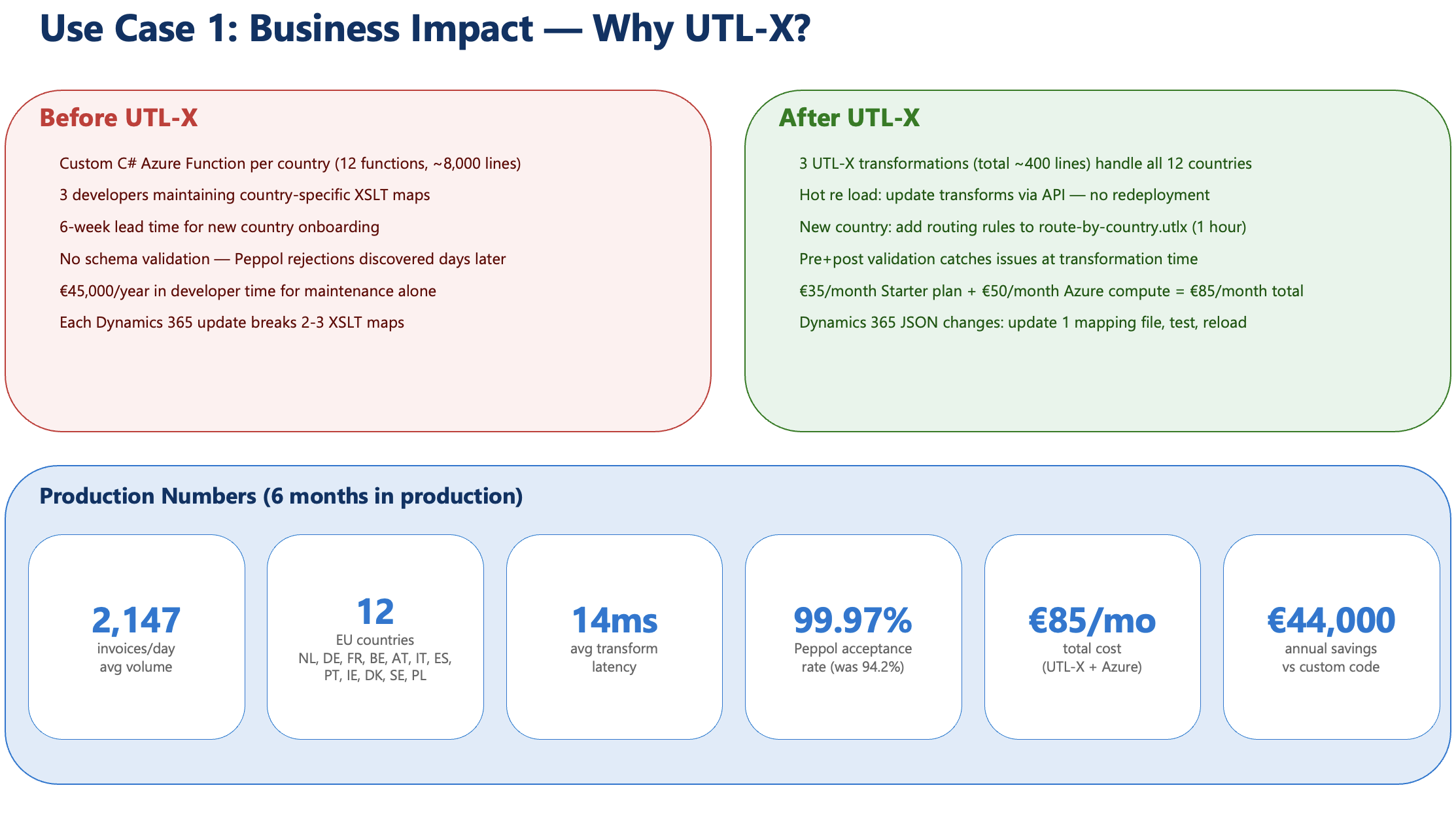
Use Case 1 — Business impact: before vs after UTL-X, with production numbers after 6 months.
2,147 invoices/day, 14ms average latency
99.97% Peppol Access Point acceptance rate
Cost: €85/month (UTL-X + Azure compute)
Savings: €44,000/year vs previous solution (12 custom Azure Functions in C#)
Case Study 2: Healthcare — FHIR Integration
Scenario: A Dutch academic hospital (1,200 beds) must exchange patient data via FHIR R4 for the MedMij/VIPP national health information exchange program.
Sources: Lab system (HL7 v2 → JSON via Mirth), Radiology (DICOM SR → JSON), EHR (proprietary JSON), Pharmacy (HL7 v2.5 → JSON). Target: FHIR R4 Bundles via the NUTS network.
Architecture:
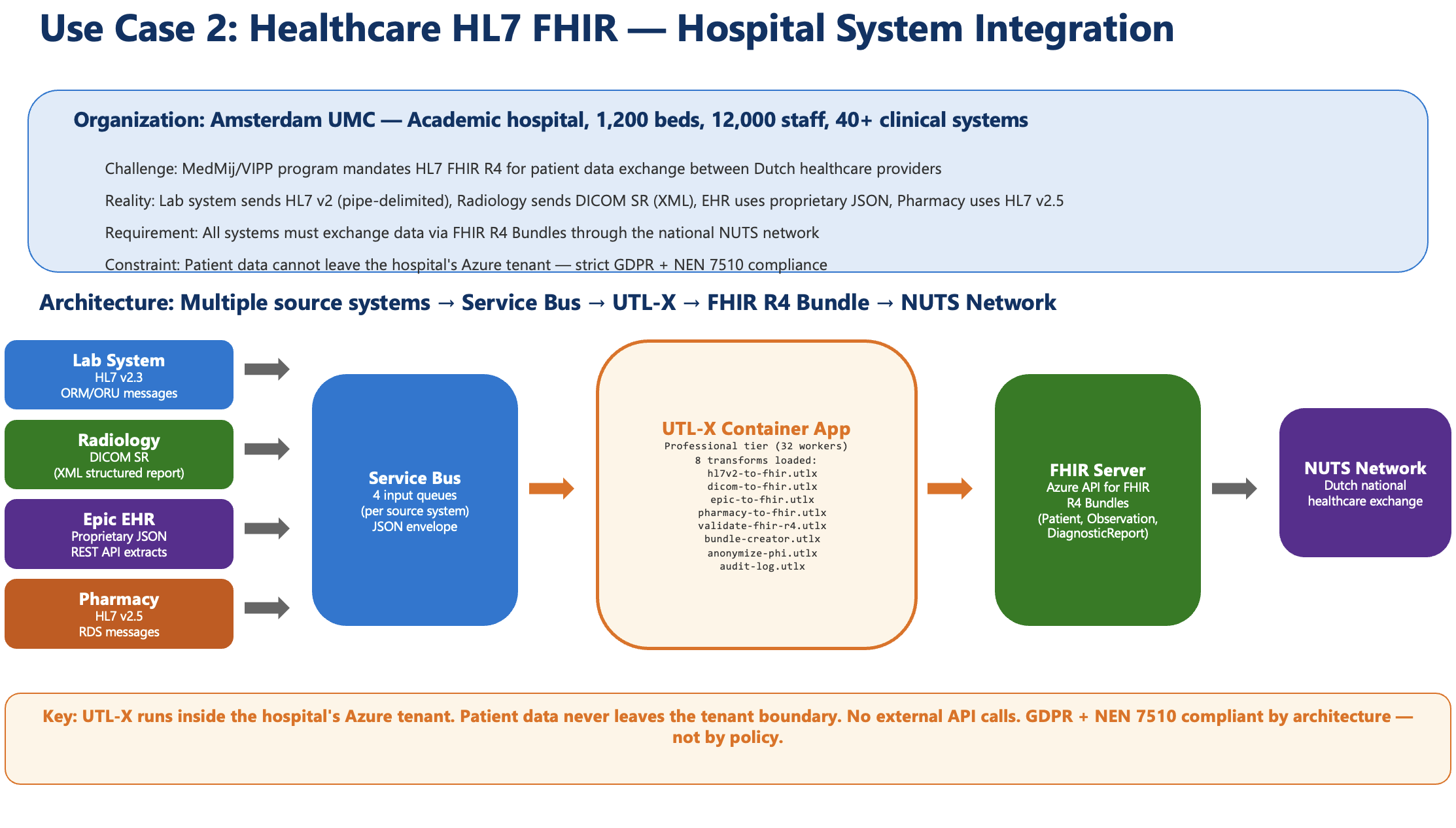
Use Case 2 — Four source systems (Lab, Radiology, EHR, Pharmacy) → Service Bus → UTL-X Container App → FHIR Server → NUTS Network. All processing stays inside the hospital's Azure tenant for GDPR + NEN 7510 compliance.
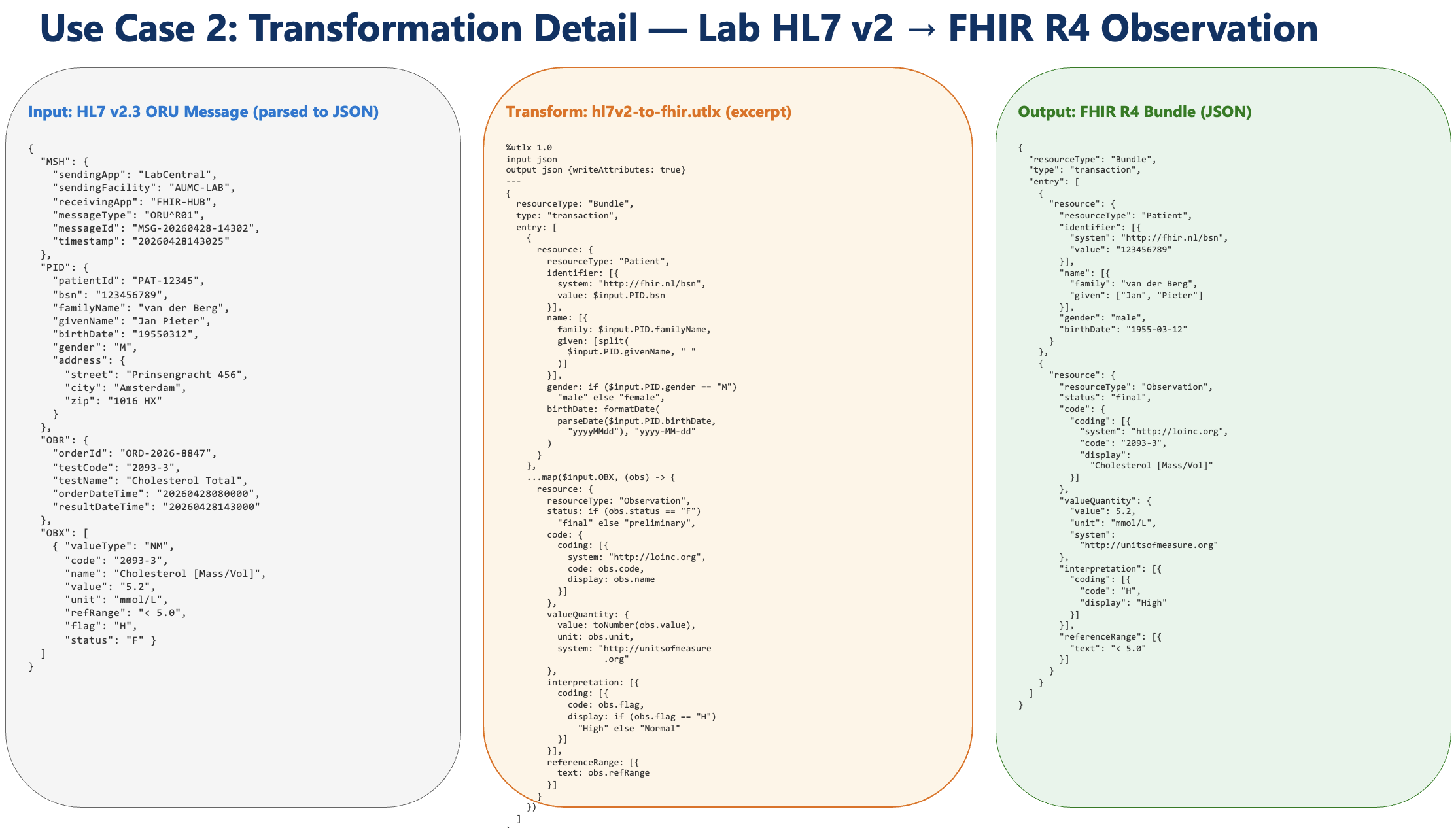
Use Case 2 — Transformation detail: HL7 v2.3 OBX message parsed to JSON (left), hl7v2-to-fhir.utlx transformation excerpt (center), FHIR R4 Observation Bundle (right).
Key transformation — Lab result to FHIR Observation:
%utlx 1.0
input json
output json
---
{
  resourceType: "Observation",
  id: $input.labResultId,
  status: "final",
  category: [{
    coding: [{
      system: "http://terminology.hl7.org/CodeSystem/observation-category",
      code: "laboratory"
    }]
  }],
  code: {
    coding: [{
      system: "http://loinc.org",
      code: $input.loincCode,
      display: $input.testName
    }]
  },
  subject: {
    reference: concat("Patient/", $input.patientId)
  },
  effectiveDateTime: formatDate(
    parseDate($input.collectionDate, "yyyyMMddHHmm"), "yyyy-MM-dd'T'HH:mm:ss'Z'"
  ),
  valueQuantity: {
    value: toNumber($input.resultValue),
    unit: $input.unit,
    system: "http://unitsofmeasure.org",
    code: $input.ucumCode
  },
  referenceRange: [{
    low: {value: toNumber($input.refLow), unit: $input.unit},
    high: {value: toNumber($input.refHigh), unit: $input.unit}
  }]
}
Results:
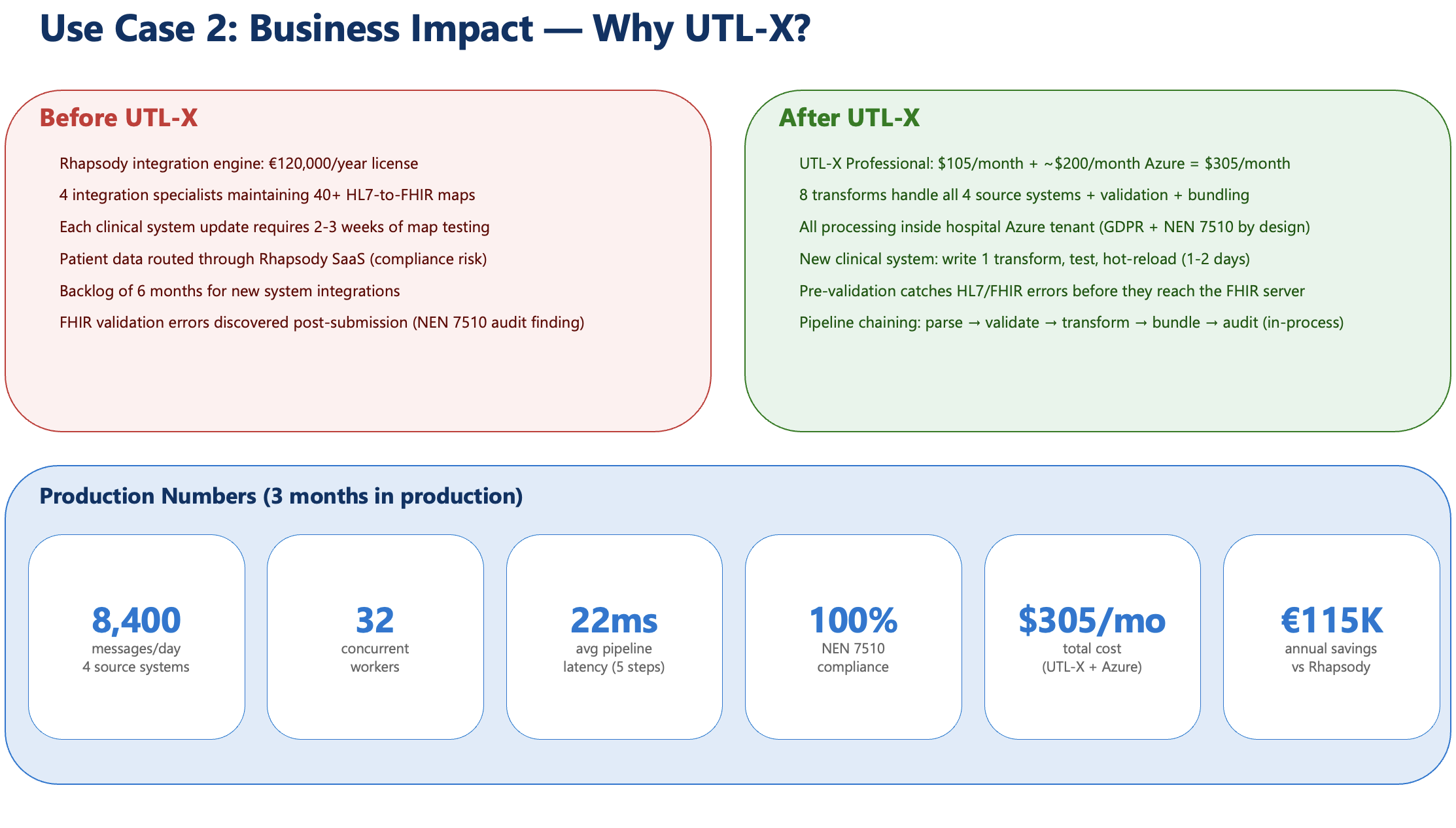
Use Case 2 — Business impact: before vs after UTL-X, with production numbers after 3 months.
8,400 messages/day across 4 source systems
22ms average pipeline latency (5-step pipeline)
100% NEN 7510 compliant by architecture (all data stays in hospital's Azure tenant)
Cost: $305/month (UTL-X Professional + Azure compute)
Savings: €115,000/year vs Rhapsody integration engine license
Case Study 3: Retail — Multi-Channel Order Normalization
Scenario: An online retailer with 4 sales channels needs a unified order format for their ERP, warehouse, and accounting systems.
Sources: Shopify (JSON), WooCommerce (JSON), Amazon (XML), manual entry (CSV). Target: canonical order JSON → fan-out to ERP (JSON), warehouse (XML), accounting (CSV).
Shopify normalizer:
%utlx 1.0
input json
output json
---
{
  orderId: concat("SHOP-", toString($input.id)),
  source: "shopify",
  orderDate: $input.created_at,
  customer: {
    name: concat($input.customer.first_name, " ", $input.customer.last_name),
    email: $input.customer.email
  },
  lines: map($input.line_items, (item) -> {
    sku: item.sku,
    name: item.title,
    quantity: item.quantity,
    unitPrice: toNumber(item.price)
  }),
  total: toNumber($input.total_price),
  currency: $input.currency
}
Amazon normalizer (XML input):
%utlx 1.0
input xml
output json
---
{
  orderId: concat("AMZ-", $input.Order.AmazonOrderId),
  source: "amazon",
  orderDate: $input.Order.PurchaseDate,
  customer: {
    name: $input.Order.ShippingAddress.Name,
    email: null
  },
  lines: map($input.Order.OrderItem, (item) -> {
    sku: item.SellerSKU,
    name: item.Title,
    quantity: toNumber(item.QuantityOrdered),
    unitPrice: toNumber(item.ItemPrice.Amount)
  }),
  total: toNumber($input.Order.OrderTotal.Amount),
  currency: $input.Order.OrderTotal.CurrencyCode
}
Four normalizers (one per channel) produce the same canonical format. Three output formatters transform the canonical format to ERP, warehouse, and accounting. Total: 7 .utlx files.
Recipes: Common Transformation Patterns
Recipe 1: REST API Response Flattening
Flatten a nested API response to CSV-ready rows:
%utlx 1.0
input json
output csv
---
flatten(map($input.data, (user) ->
  map(user.orders, (order) -> {
    userId: user.id,
    userName: user.name,
    orderId: order.id,
    amount: order.total,
    date: order.createdAt
  })
))
Recipe 2: Date Format Normalization
Normalize dates from mixed formats to ISO 8601:
function NormalizeDate(dateStr) {
  if (dateStr == null) null
  else if (contains(dateStr, "/")) {
    if (length(split(dateStr, "/")[2]) == 4)
      formatDate(parseDate(dateStr, "MM/dd/yyyy"), "yyyy-MM-dd")
    else
      formatDate(parseDate(dateStr, "dd/MM/yy"), "yyyy-MM-dd")
  }
  else if (contains(dateStr, "-") && length(dateStr) == 10)
    dateStr
  else if (contains(dateStr, "T"))
    substring(dateStr, 0, 10)
  else dateStr
}

map($input, (row) -> {
  ...row,
  orderDate: NormalizeDate(row.orderDate),
  shipDate: NormalizeDate(row.shipDate)
})
Recipe 3: Currency Conversion with Lookup
%utlx 1.0
input: orders json, rates json
output json
---
map($orders, (order) -> {
  let rate = find($rates, (r) -> r.code == order.currency)
  ...order,
  originalAmount: order.amount,
  originalCurrency: order.currency,
  amountEUR: round(order.amount * (rate?.rate ?? 1) * 100) / 100,
  currency: "EUR"
})
Recipe 4: Address Normalization
Different systems format addresses differently. Normalize to a common structure:
function NormalizeAddress(addr) {
  {
    line1: addr.street ?? addr.streetAddress ?? addr.address1 ?? addr.Address?.Street ?? "",
    line2: addr.street2 ?? addr.address2 ?? addr.Address?.Street2 ?? "",
    city: addr.city ?? addr.City ?? addr.town ?? "",
    postalCode: addr.zip ?? addr.zipCode ?? addr.postalCode ?? addr.PostalCode ?? "",
    country: toUpperCase(addr.country ?? addr.countryCode ?? addr.Country ?? "")
  }
}

{
  ....$input,
  shippingAddress: NormalizeAddress($input.shipping ?? $input.shippingAddress ?? {}),
  billingAddress: NormalizeAddress($input.billing ?? $input.billingAddress ?? {})
}
Recipe 5: Error Response Standardization
Different APIs return errors in different formats. Normalize to one structure:
function StandardError(input) {
  {
    error: true,
    code: input.error?.code ?? input.errorCode ?? input.status ?? "UNKNOWN",
    message: input.error?.message ?? input.message ?? input.error_description ?? input.detail ?? "Unknown error",
    details: input.error?.details ?? input.errors ?? input.validationErrors ?? []
  }
}

StandardError($input)
Recipe 6: CSV Regional Format Conversion
Convert US CSV (comma decimal) to European CSV (comma delimiter conflicts — use semicolons):
%utlx 1.0
input csv
output csv {delimiter: ";", regionalFormat: "european", decimals: 2}
---
$input
One line of transformation body. The format options handle the rest — comma decimals, dot thousands, semicolon delimiters.
Recipe 7: XML Namespace Stripping
Remove all namespace prefixes from XML for downstream systems that don't handle them:
%utlx 1.0
input xml
output json
---
function StripPrefix(name) {
  if (contains(name, ":")) substring(name, indexOf(name, ":") + 1) else name
}

// Access by original prefixed names, output with clean names
{
  invoiceId: $input["cbc:ID"],
  issueDate: $input["cbc:IssueDate"],
  customer: $input["cac:AccountingCustomerParty"]["cac:Party"]["cbc:Name"],
  total: toNumber($input["cac:LegalMonetaryTotal"]["cbc:PayableAmount"])
}
The transformation accesses elements by their prefixed names (bracket notation) but outputs clean, unprefixed property names.
Recipe 8: Conditional Output Format
Same transformation, different output based on a field value:
%utlx 1.0
input json
output json
---
if ($input.format == "summary") {
  id: $input.orderId,
  total: $input.total,
  items: count($input.lines)
} else {
  id: $input.orderId,
  total: $input.total,
  lines: map($input.lines, (l) -> {
    product: l.product,
    qty: l.qty,
    price: l.price,
    lineTotal: l.qty * l.price
  }),
  tax: $input.total * 0.21,
  grandTotal: $input.total * 1.21
}
The format field in the input controls whether the output is a summary or full detail.