Schema-to-Schema Mapping
This chapter is about thinking in schemas — defining your input and output contracts before writing transformation code. It covers how traditional tools approach schema mapping (and why their XSLT-centric approach is broken for JSON), how UTL-X handles it differently, and the full matrix of schema-to-schema conversions.
If you just want to transform data and don't care about schemas, you can skip this chapter. But if you're building production integrations — especially in regulated industries like finance, healthcare, or government — schema-driven development is non-negotiable.
Why Schema Mapping Matters
A schema defines the contract between two systems: what fields exist, what types they are, which are required, and what constraints apply. Without schemas, integration is ad-hoc — you discover missing fields, wrong types, and structural mismatches at runtime, often in production.
Professional integration starts with schemas:
Define the input schema: "What does the source system send?"
Define the output schema: "What does the target system expect?"
Write the transformation: "How do I map from one to the other?"
Validate: "Does my output actually match the contract?"
This is how every mature integration platform works — Tibco BW, SAP CPI, MuleSoft, and now UTL-X. The difference is which schema formats they support and how they do the mapping.
How Traditional Tools Do It
The XSLT Approach
In Tibco BW, SAP CPI, and Azure Logic Apps, the workflow is:
Load source XSD (XML Schema)
Load target XSD
Draw mapping lines between elements in a visual mapper
The tool generates an XSLT stylesheet
Runtime: XML input → XSLT processor → XML output
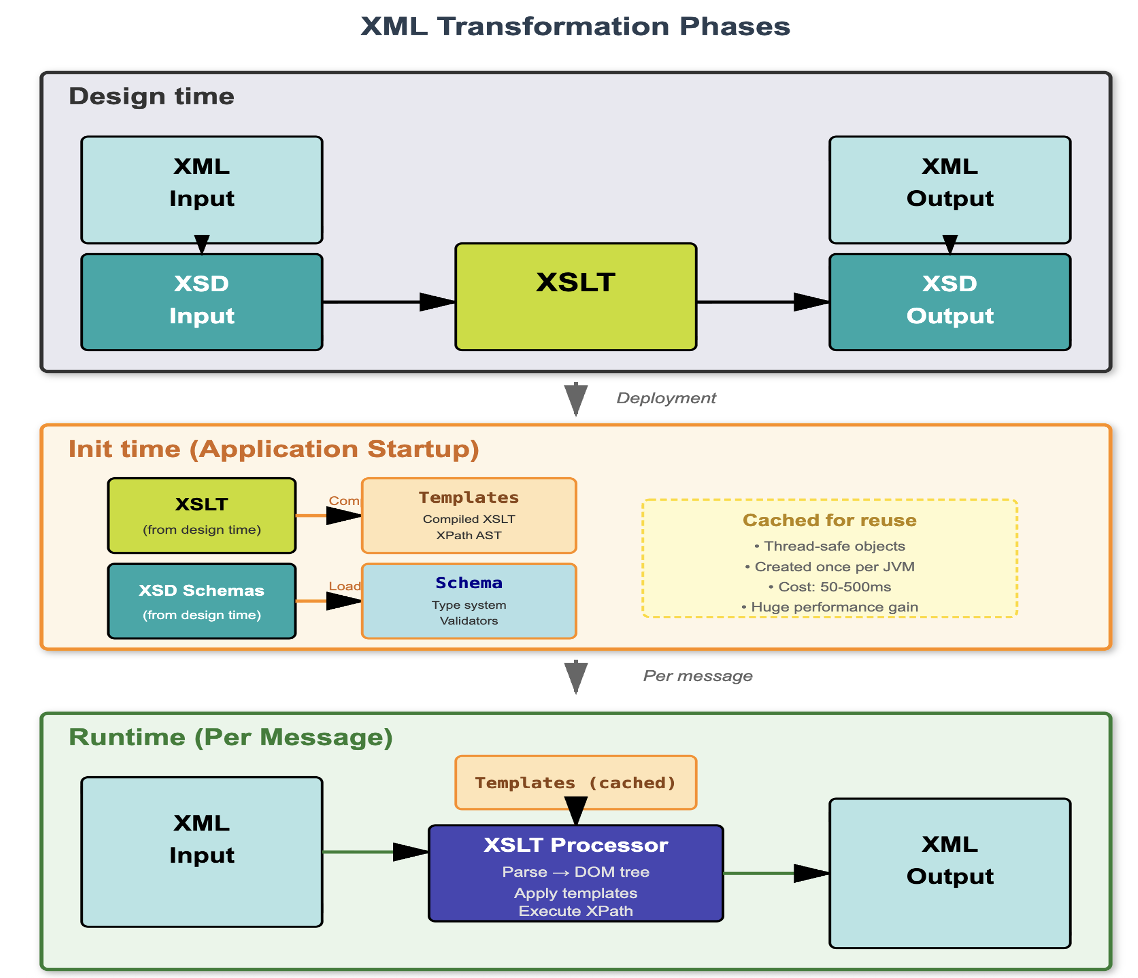
XML transformation phases — Design time: XSD schemas define input/output contracts, XSLT maps between them. Init time: XSLT compiled and cached. Runtime: XML parsed, XSLT applied, XML produced. This model works — but only for XML.
This works well for XML-to-XML transformations. The problem is: what about JSON?
The JSON Problem
Most modern APIs use JSON. But the mapping tools above only understand XSD (XML schemas). So they do this:
JSON arrives
Convert JSON to XML (using an internal XML "infoset" representation)
Load the source XSD (generated from JSON Schema or inferred)
Apply XSLT transformation
XML output
Convert XML back to JSON
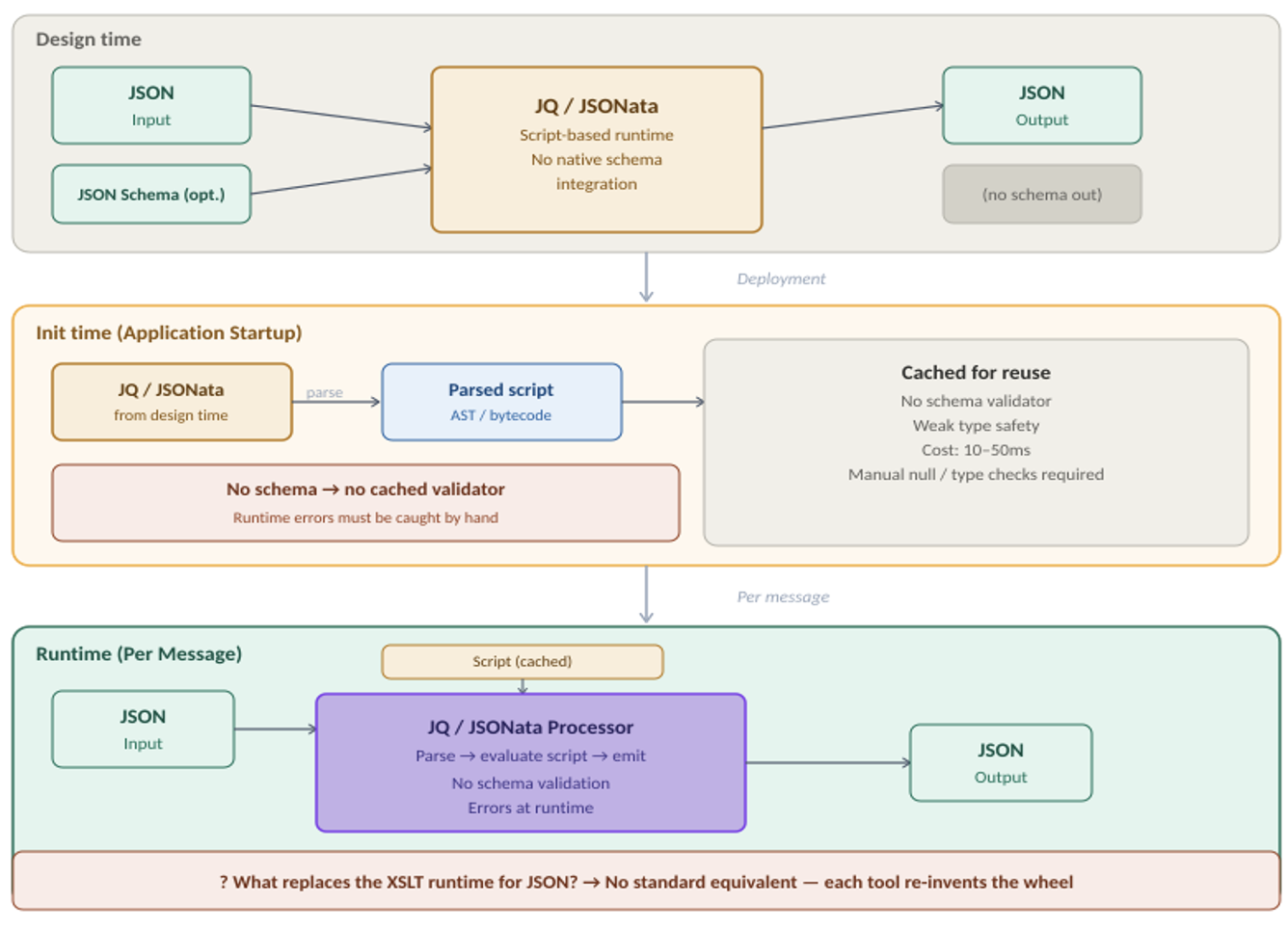
JSON transformation phases — no standard equivalent to XSLT exists. jq and JSONata fill parts of the gap but have no native schema binding, no cached validators, and no type system. Each tool re-invents the wheel.
Four conversion steps. Two of them lossy:
JSON → XML is lossy: JSON has typed values (numbers, booleans). XML has only text. JSON arrays have no element names. JSON has no attributes. These semantic gaps mean the conversion is an approximation, not an equivalence.
XML → JSON is lossy: XML attributes have no JSON equivalent. Single vs repeated elements (object vs array) is ambiguous. Namespace prefixes are stripped or mangled.
This anti-pattern is not theoretical — it's how Azure Logic Apps' Data Mapper, SAP CPI's Message Mapping, and Tibco BW work today. MuleSoft's DataWeave is the notable exception — it's format-agnostic, like UTL-X.
The UTL-X Approach
UTL-X doesn't convert between formats before mapping. The transformation operates on the UDM (Universal Data Model), which represents all formats natively:
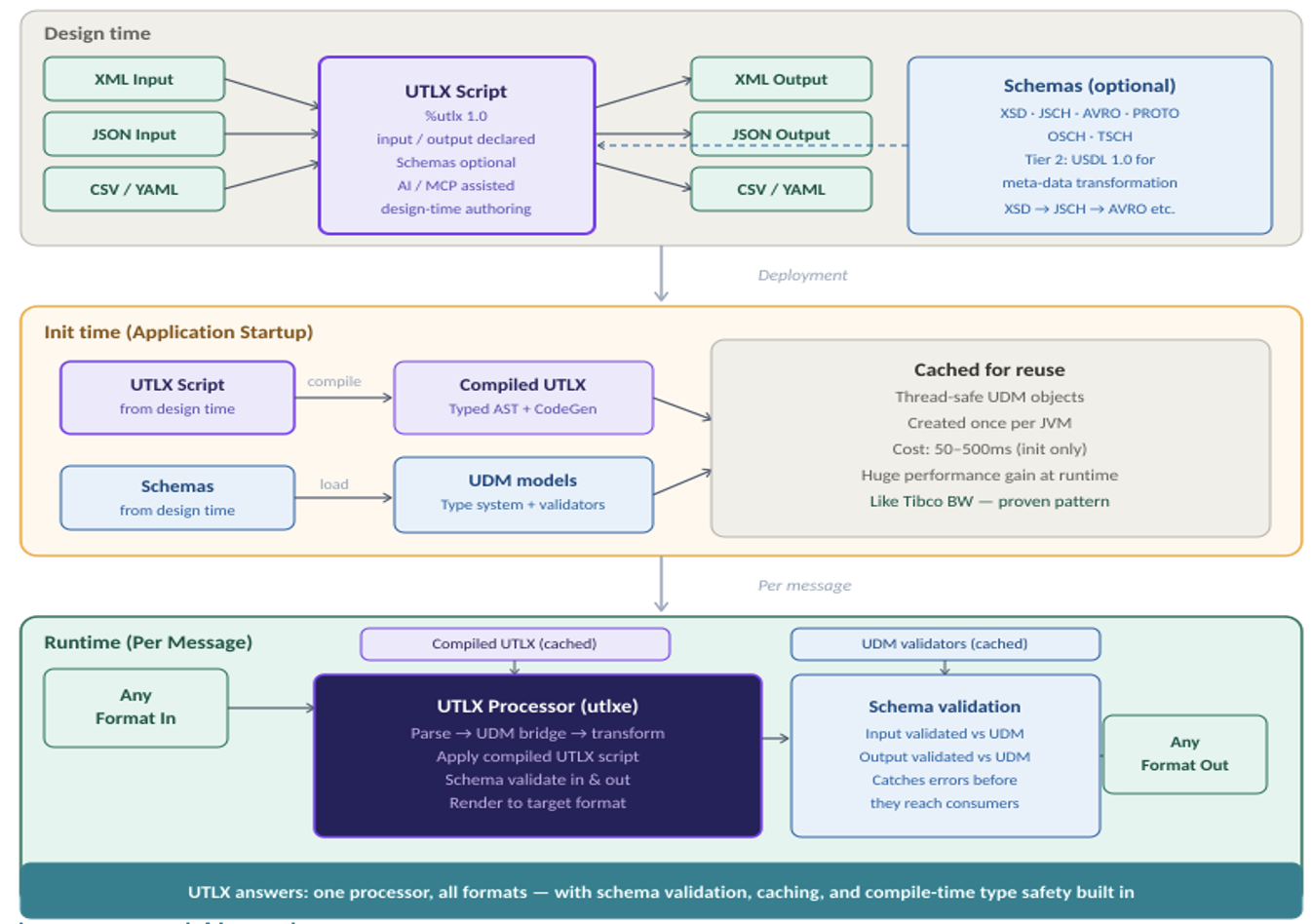
UTL-X transformation phases — one processor, all formats. Design time: any format declared, schemas optional. Init time: script compiled to typed AST, UDM models and validators cached. Runtime: parse any input, apply compiled UTL-X, validate and render to any output format.
JSON input: parsed directly to UDM (lossless)
XML input: parsed directly to UDM (attributes and namespaces preserved)
CSV input: parsed directly to UDM (rows become objects)
No intermediate XML. No XSLT. No lost types.
The schema mapping is format-agnostic too. You can map from a JSON Schema to an XSD-defined structure — UTL-X handles the format differences in parsing and serialization, not in the mapping logic.
Tier 1: Instance Data Mapping
Instance data mapping is what most people think of when they hear "transformation": converting actual data from one structure to another.
Every Data Format Has an Accompanying Schema Format
| Data Format (Tier 1) | Schema Format (Tier 2) | Standard |
| JSON | JSON Schema | IETF drafts (04 through 2020-12) |
| XML | XSD | W3C XML Schema Definition |
| CSV | Table Schema (TSCH) | Frictionless Data |
| YAML | JSON Schema | Shared with JSON |
| OData | EDMX / CSDL (OSCH) | OASIS OData |
The schema describes the structure of the data. UTL-X can validate input and output against these schemas. The transformation maps between instances (actual data), guided by the schemas.
Common Instance Mapping Scenarios
JSON → JSON: REST API v1 response → REST API v2 request
XML → JSON: SOAP response → REST API request
CSV → XML: bank statement → SEPA payment instruction (pain.001)
JSON → CSV: API data → Excel-compatible report
XML → XML: UBL invoice → country-specific tax format
OData → JSON: Dynamics 365 data → internal canonical model
In every case, UTL-X handles the format conversion automatically. You focus on the field mapping — which field goes where, what calculations are needed, what conditions apply.
Tier 2: Metadata Mapping (Schema-to-Schema)
This is where UTL-X is unique: it can transform schemas themselves, not just data instances.
Why Metadata Mapping Is Powerful
Imagine you have an XSD for your XML API, but your new consumer needs a JSON Schema for their OpenAPI specification. Traditionally, you'd manually recreate the schema — tedious, error-prone, and impossible to keep synchronized.
With UTL-X, you transform the schema:
%utlx 1.0
input xsd
output jsch
---
$input
The XSD is parsed as structured data (it's XML, after all). The JSON Schema is produced by the JSCH serializer. Types, constraints, and structure are mapped automatically.
The Full Schema-to-Schema Matrix
UTL-X supports conversion between all Tier 2 schema formats:
| From / To | XSD | JSCH | Avro | Proto | OSCH | TSCH |
| XSD | – | Yes | Yes | Yes | Yes | Yes |
| JSCH | Yes | – | Yes | Yes | Yes | Yes |
| Avro | Yes | Yes | – | Yes | Partial | Yes |
| Proto | Yes | Yes | Yes | – | Partial | Yes |
| OSCH | Yes | Yes | Partial | Partial | – | Yes |
| TSCH | Yes | Yes | Yes | Yes | Yes | – |
"Partial" means some semantic concepts don't map perfectly between formats (e.g., OData navigation properties have no direct Avro equivalent). The conversion preserves what it can and documents what it can't.
Practical Use Cases for Schema Mapping
API gateway migration: Your organization is moving from SOAP (WSDL/XSD) to REST (OpenAPI/JSON Schema). Transform the XSD types to JSON Schema — automatically, not manually.
Kafka pipeline: Your producer uses JSON Schema but your schema registry requires Avro. Transform the schema format without changing the data format.
Data contract generation: You have an XSD for your XML feed. Generate a Table Schema (TSCH) for CSV data quality validation of the same data in flat-file form.
Documentation: Transform any schema into a human-readable table of field names, types, and constraints.
Code generation: Transform a schema into TypeScript interfaces, Java classes, or database DDL.
Nested Schemas: Include and Import
Real-world schemas are rarely single files. They reference other schemas — sometimes dozens of them. A UBL invoice schema imports common types, which import data types, which import core components. Understanding how these references work is essential for schema-to-schema mapping.
XSD: Include vs Import
XSD has two mechanisms for composing schemas, and the difference matters:
xs:include brings components from another schema file into the same namespace. The included file either has the same target namespace or no namespace at all (the "chameleon" pattern — it adopts the including schema's namespace). After include, all types are in one namespace as if they were defined in a single file.
<!-- order.xsd — target namespace: urn:example:orders -->
<xs:schema xmlns:xs="http://www.w3.org/2001/XMLSchema"
           targetNamespace="urn:example:orders">
  <xs:include schemaLocation="common-types.xsd"/>  <!-- same namespace -->
  <xs:element name="Order" type="OrderType"/>
</xs:schema>
xs:import brings components from a different namespace. This is how cross-domain schemas are composed — an order schema imports customer types from the CRM namespace, address types from a shared namespace, and country codes from an ISO standard namespace. Each retains its own namespace prefix.
<!-- order.xsd — imports from a different namespace -->
<xs:schema xmlns:xs="http://www.w3.org/2001/XMLSchema"
           xmlns:cust="urn:example:customers"
           targetNamespace="urn:example:orders">
  <xs:import namespace="urn:example:customers"
             schemaLocation="customer-types.xsd"/>  <!-- different namespace -->
  <xs:element name="Order">
    <xs:complexType>
      <xs:sequence>
        <xs:element name="Customer" type="cust:CustomerType"/>
      </xs:sequence>
    </xs:complexType>
  </xs:element>
</xs:schema>
The rule: include = same family (same namespace), import = different family (different namespace). Enterprise schemas like UBL and ISO 20022 use both extensively — a typical UBL invoice pulls in 10+ schema files via a chain of includes and imports.
Other Format Mechanisms
Each schema format has its own composition mechanism:
JSON Schema:
\$ref— local (#/definitions/Address) and remote (./address.json#/Address) references. Draft 2020-12 added\$dynamicReffor extensibility.Avro: Named types referenced by their full name across schemas. No explicit import — types are resolved by name from the registry.
Protobuf:
import "other.proto"— explicit file import.import publicre-exports for transitive visibility.OpenAPI:
\$refto#/components/schemas/...(local) or external files. Supports splitting a large API spec across files.RAML:
!includefor fragments,uses:for libraries, overlays and extensions for modular specs.
How UTL-X Handles Nested Schemas
UTL-X resolves all references during parsing:
Follow includes and imports recursively (loading referenced files)
Build a complete type graph (all types from all files visible)
Make all types available for mapping (regardless of which file defined them)
Preserve reference structure in output (for round-trip fidelity)
This means you can transform a complex, multi-file XSD with imports into a single JSON Schema with \$ref definitions — or flatten everything into one file. The type graph is the same either way; only the serialization changes.
JSON Schema to JSON Schema Mapping
A special but common case: transforming between JSON Schema versions.
JSON Schema has evolved through multiple drafts — draft-04, draft-06, draft-07, 2019-09, and 2020-12. Each version introduced new keywords, changed semantics, or deprecated features.
UTL-X can migrate schemas between versions:
draft-04 → 2020-12: update
\$schemaURI, replacedefinitionswith\$defs, update\$refsyntaxAdd or remove fields while preserving constraints
Rename properties while maintaining validation rules
This is valuable for API versioning — evolve the schema while maintaining backward compatibility.
Schema-Driven Validation in UTL-X
Schemas aren't just for documentation — UTL-X uses them for runtime validation:
Pre-Validation
Validate the input before transformation:
%utlx 1.0
input json {schema: "order-input.json"}
output xml
---
// transformation body
If the input doesn't match order-input.json (a JSON Schema), the transformation fails with a validation error — before any mapping code runs. This catches data quality issues at the source.
Post-Validation
Validate the output after transformation:
%utlx 1.0
input json
output xml {schema: "invoice-output.xsd"}
---
// transformation body
If the output doesn't match invoice-output.xsd, the transformation fails — catching mapping bugs before they reach the target system.
The Validation Orchestrator
UTLXe's validation orchestrator runs validation in a sandwich pattern:
Pre-validate input against input schema
Execute transformation
Post-validate output against output schema
If any step fails, the message is rejected with a detailed error — field name, constraint violated, expected vs actual value. No partial results, no corrupted output.
The Bridge: USDL
The next chapter introduces USDL — UTL-X's own Universal Schema Definition Language. USDL is to schemas what UDM is to data: a format-agnostic representation that bridges all schema formats.
Where UDM asks "what does the data look like?", USDL asks "what should the data look like?" — types, constraints, cardinality, and documentation in one portable format.