The Universal Data Model (UDM)
The Universal Data Model is the single most important concept in UTL-X. It's the abstraction that makes format-agnosticism possible — the internal representation that lets your transformation work identically whether the input is XML, JSON, CSV, YAML, or OData.
This chapter explains what UDM is, how each format maps to it, and why certain design decisions were made. If you want to understand why UTL-X works the way it does — not just how — this is the chapter.
Why UDM Exists
Consider the problem: XML has elements, attributes, namespaces, and mixed content. JSON has objects, arrays, strings, numbers, booleans, and null. CSV has rows and columns. YAML has all of JSON's types plus anchors, aliases, and tags.
Without an intermediate representation, a transformation engine would need separate logic for every format combination:
XML → JSON: handle attributes, namespaces, text nodes
JSON → XML: handle types (number → string), arrays (→ repeated elements)
CSV → JSON: handle headers, type detection
XML → CSV: handle hierarchy flattening
... and so on for every pair
With N formats, that's N × (N-1) conversion paths — each with its own edge cases and bugs.
UDM eliminates this by providing one common tree structure:
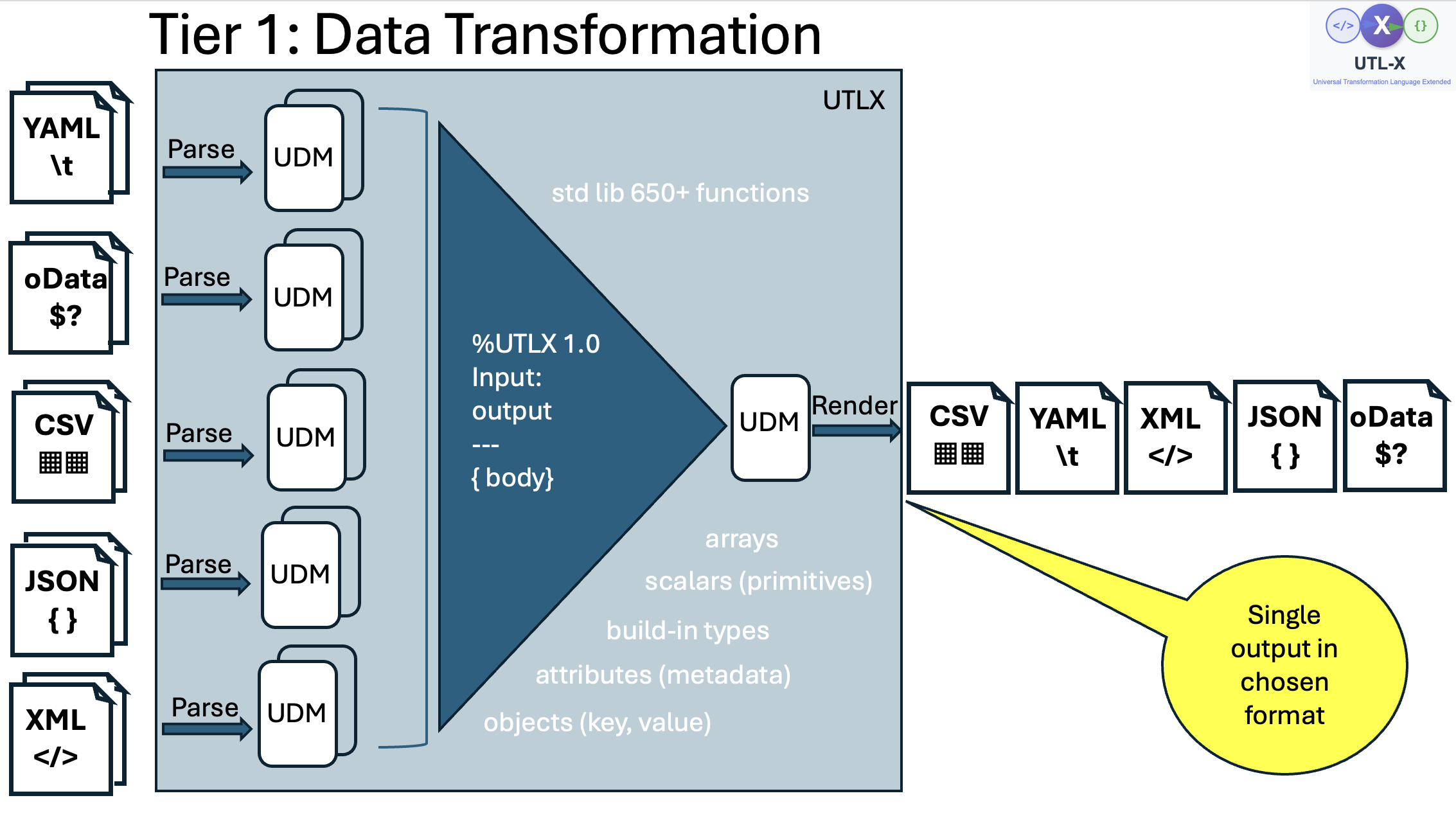
Tier 1 data transformation — all input formats (XML, JSON, CSV, YAML, OData) are parsed into UDM. The transformation operates on UDM. The result is rendered to the chosen output format.
Every input format is parsed into UDM. Every transformation operates on UDM. Every output format is serialized from UDM. The transformation never touches raw XML tags or JSON braces — it works with the meaning of the data.
UDM Types
UDM has eight types. Every piece of data from any format maps to one of these:
| UDM Type | What it holds | Examples |
| Scalar | A single value: string, number, boolean, or null | "Alice", 42, 3.14, true, null |
| Object | Named properties + optional XML attributes + metadata | |
| Array | Ordered list of UDM values | [1, 2, 3], [{...}, {...}] |
| DateTime | Timestamp with timezone (ISO 8601) | 2026-04-28T14:30:00Z |
| Date | Date only, no time | 2026-04-28 |
| LocalDateTime | Date and time without timezone | 2026-04-28T14:30:00 |
| Time | Time only, no date | 14:30:00 |
| Binary | Raw byte array | Binary file content |
There's also a Lambda type for function values, but you rarely encounter it directly — it's used internally for map, filter, and other higher-order functions.
The first three types — Scalar, Object, and Array — account for 99% of real-world data. The temporal types (DateTime, Date, LocalDateTime, Time) provide first-class date handling without string parsing at every access.
How Formats Map to UDM
JSON → UDM
JSON maps to UDM almost directly — JSON was the inspiration for UDM's structure:
| JSON | UDM |
| String: "Alice" | Scalar(string: "Alice") |
| Number: 42 | Scalar(number: 42) |
| Boolean: true | Scalar(boolean: true) |
| Null: null | Scalar(null) |
| Object: | Object(properties: {name → Scalar("Alice")}) |
| Array: [1, 2, 3] | Array(elements: [Scalar(1), Scalar(2), Scalar(3)]) |
JSON-to-UDM is lossless. UDM-to-JSON is lossless. Round-trip fidelity is guaranteed.
XML → UDM
XML is more complex because it has features that JSON lacks: attributes, namespaces, mixed content, and the distinction between elements and text.
| XML | UDM |
| Element with children: <Order><Customer>...</Customer></Order> | Object(properties: {Customer → ...}) |
| Element with text: <Name>Alice</Name> | Object(properties: {_text → Scalar("Alice")}) |
| Attribute: id="123" | Stored in Object.attributes map |
| Repeated elements: <Item/><Item/> | Array of Objects |
| Namespace: xmlns="..." | Stored in Object.metadata |
The key design decisions for XML:
Text content uses _text. When an XML element contains only text — like <Name>Alice</Name> — the text is stored as a property called _text inside the UDM Object. This is an internal convention that you never see in output (the serializers unwrap it automatically). It exists because UDM Objects store properties as a map, and the text content needs a key.
When you write $input.Order.Customer, UTL-X automatically unwraps the _text and returns "Alice" — not the internal {_text: "Alice"} wrapper. This unwrapping is described in detail in Chapter 23.
Attributes are separate. XML attributes are stored in a separate attributes map on the UDM Object, not mixed with child element properties. This prevents name collisions — an element could theoretically have both a child element and an attribute with the same name. Access attributes with the @ prefix: $input.Order.@id.
Repeated elements become arrays. When an XML element appears multiple times with the same name, they're automatically grouped into a UDM Array. <Item/><Item/><Item/> becomes an Array of three Objects. Single elements stay as Objects (not wrapped in an array) unless array hints are provided.
CSV → UDM
CSV maps to an Array of Objects, where each row becomes an Object with column headers as property names:
name,age,city
Alice,30,Amsterdam
Bob,25,Rotterdam
Becomes:
Array([
  Object({name: "Alice", age: 30, city: "Amsterdam"}),
  Object({name: "Bob", age: 25, city: "Rotterdam"})
])
Numbers are auto-detected: "30" becomes Scalar(number: 30), not Scalar(string: "30"). Booleans too: "true" becomes Scalar(boolean: true).
YAML → UDM
YAML is a superset of JSON, so the mapping is the same as JSON. YAML-specific features (anchors, aliases, tags) are resolved during parsing — the resulting UDM is identical to what JSON would produce for the same data.
OData → UDM
OData JSON is standard JSON with metadata conventions (@odata.context, @odata.type). These metadata properties are parsed as regular Object properties — accessible via $input["@odata.context"].
UDM Navigation
Dot Notation
The primary way to access data:
$input.Order.Customer.Name          // nested property access
$input.Order.Items.Item[0].Price    // array element access
$input.Order.@id                     // XML attribute access
Safe Navigation
Handle missing properties gracefully with ?.:
$input.Order?.Customer?.Name // returns null if any step is missingWithout ?., a missing intermediate property causes an error. With ?., you get null — which you can then handle with ?? (nullish coalescing):
$input.Order?.Customer?.Name ?? "Unknown Customer"Recursive Descent
Find a property name at any depth with ..:
$input..ProductCode // finds ProductCode anywhere in the treeReturns an array of all matches. Useful for deeply nested or variable-depth structures.
UDM and Type Coercion
UTL-X provides both automatic and explicit type coercion.
Automatic Coercion
In certain contexts, UTL-X converts types automatically:
String concatenation:
concat("Total: ", 42)— number 42 becomes string "42"XML text unwrapping:
$input.Customer— the internal _text Object unwraps to the scalar value
Explicit Coercion
Use stdlib functions for explicit conversion:
toString(42)           // "42"
toNumber("42")         // 42
toBoolean("true")      // true
toNumber("not-a-num")  // 0 (returns 0 for unparseable input)
XML Text Node Unwrapping
This is the most important coercion in UTL-X. When XML is parsed:
<Name>Alice</Name>The UDM contains: Object(properties: {_text: Scalar("Alice")}).
But when you write $input.Name, you get "Alice" — not the wrapper object. UTL-X automatically unwraps the _text node during property access. This is handled by the interpreter (for TEMPLATE strategy) and RuntimeOps (for COMPILED strategy).
The unwrapping rules:
If an Object has only a
_textproperty and no real attributes → unwrap to the scalarIf an Object has
_textAND attributes → keep as Object (attributes would be lost)If an Object has child elements → no unwrapping (it's a real object)
Chapter 23 covers the design decisions behind these rules in detail.
UDM is Format-Agnostic, Transformations are Format-Agnostic
The key insight: because UDM normalizes all formats into one tree, your transformation expression is identical regardless of input format.
The expression $input.Order.Customer works whether the input is:
XML:
<Order><Customer>Alice</Customer></Order>JSON:
\{"Order": \{"Customer": "Alice"\}\}YAML:
Order:\n Customer: Alice
Change input xml to input json in the header — the body stays the same. This is what "format-agnostic" means in practice: the transformation logic is decoupled from the serialization format.
UDM and Flat/Relational Data
UDM is inherently hierarchical — Objects contain Objects which contain Objects. This mirrors XML and JSON naturally. But not all data is hierarchical.
The Flat Data Challenge
Consider SAP IDoc segments exported as XML. Orders and order lines are siblings, not nested:
<IDOC>
  <E1EDK01><BELNR>ORD-001</BELNR><CURRENCY>EUR</CURRENCY></E1EDK01>
  <E1EDP01><BELNR>ORD-001</BELNR><MATNR>Widget</MATNR><MENGE>2</MENGE></E1EDP01>
  <E1EDP01><BELNR>ORD-001</BELNR><MATNR>Gadget</MATNR><MENGE>1</MENGE></E1EDP01>
  <E1EDK01><BELNR>ORD-002</BELNR><CURRENCY>USD</CURRENCY></E1EDK01>
  <E1EDP01><BELNR>ORD-002</BELNR><MATNR>Gizmo</MATNR><MENGE>5</MENGE></E1EDP01>
</IDOC>
The order lines belong to orders — but the relationship is in the BELNR field value, not in the XML structure. UDM parses this as siblings in the same array, with no awareness that BELNR is a join key.
This pattern appears in SAP IDocs, EDI/EDIFACT segments, database exports, and any flat file where parent-child relationships are expressed through reference keys rather than nesting.
How to Handle It in UTL-X
Use groupBy to build a lookup, then map to construct the hierarchy:
let headers = $input.IDOC.E1EDK01
let linesByOrder = groupBy($input.IDOC.E1EDP01, (line) -> line.BELNR)

map(headers, (header) -> {
  orderId: header.BELNR,
  currency: header.CURRENCY,
  lines: map(linesByOrder[header.BELNR] ?? [], (line) -> {
    product: line.MATNR,
    quantity: toNumber(line.MENGE)
  })
})
The groupBy creates an indexed map (O(N) to build), and each header does an O(1) key lookup — efficient even with thousands of records.
For multi-level nesting (header → line → schedule), chain multiple groupBy calls:
let linesByOrder = groupBy($input.lines, (l) -> l.orderId)
let schedulesByLine = groupBy($input.schedules, (s) -> s.lineId)

map($input.headers, (h) -> {
  ...h,
  lines: map(linesByOrder[h.orderId] ?? [], (l) -> {
    ...l,
    schedules: schedulesByLine[l.lineId] ?? []
  })
})
Hierarchical vs Relational: A Design Trade-Off
Tools like IBM's Mercator (later WTX) solved this with an "intermediate card" — a declarative mapping that specifies join keys and cardinalities. The engine then automatically restructures flat data into hierarchies.
UTL-X takes a different approach: the groupBy + map pattern uses existing language constructs instead of a separate mapping artifact. This is more verbose but more flexible — you can add conditions, transformations, and error handling at each level.
The nestBy() stdlib function simplifies the common case:
let enrichedOrders = nestBy(
  $input.IDOC.E1EDK01,           // parent records
  $input.IDOC.E1EDP01,           // child records
  (header) -> header.BELNR,       // parent key extractor
  (line) -> line.BELNR,           // child key extractor
  "lines"                         // name for the new property on each parent
)
The name reads naturally: "nest E1EDP01 records by BELNR into a property called lines." The 5th parameter ("lines") is a string that becomes a new property name on each parent object. After nestBy(), every E1EDK01 gains a .lines property containing its matched E1EDP01 records — you access it with dot notation like any other property:
// After nestBy(), .lines is a regular property:
map(enrichedOrders, (order) -> {
  orderId: order.BELNR,
  lineCount: count(order.lines),
  total: sum(map(order.lines, (l) -> toNumber(l.MENGE) * toNumber(l.PRICE)))
})
See Chapter 21 (Data Restructuring) for the full analysis, performance characteristics, and multi-level nesting patterns.
UDM and Schema Formats (Tier 2)
The diagrams above show Tier 1 data transformations — instance documents (JSON, XML, CSV, YAML, OData) parsed into UDM. But UTL-X also handles Tier 2 schema formats: XSD, JSON Schema, Avro, Protobuf, OData Schema (EDMX), and Table Schema.
When a Tier 2 format is the input, the parser produces UDM enriched with USDL directives (%types, %fields, %kind) — see Chapter 12. The transformation can then work with both the raw schema structure and the normalized USDL properties.
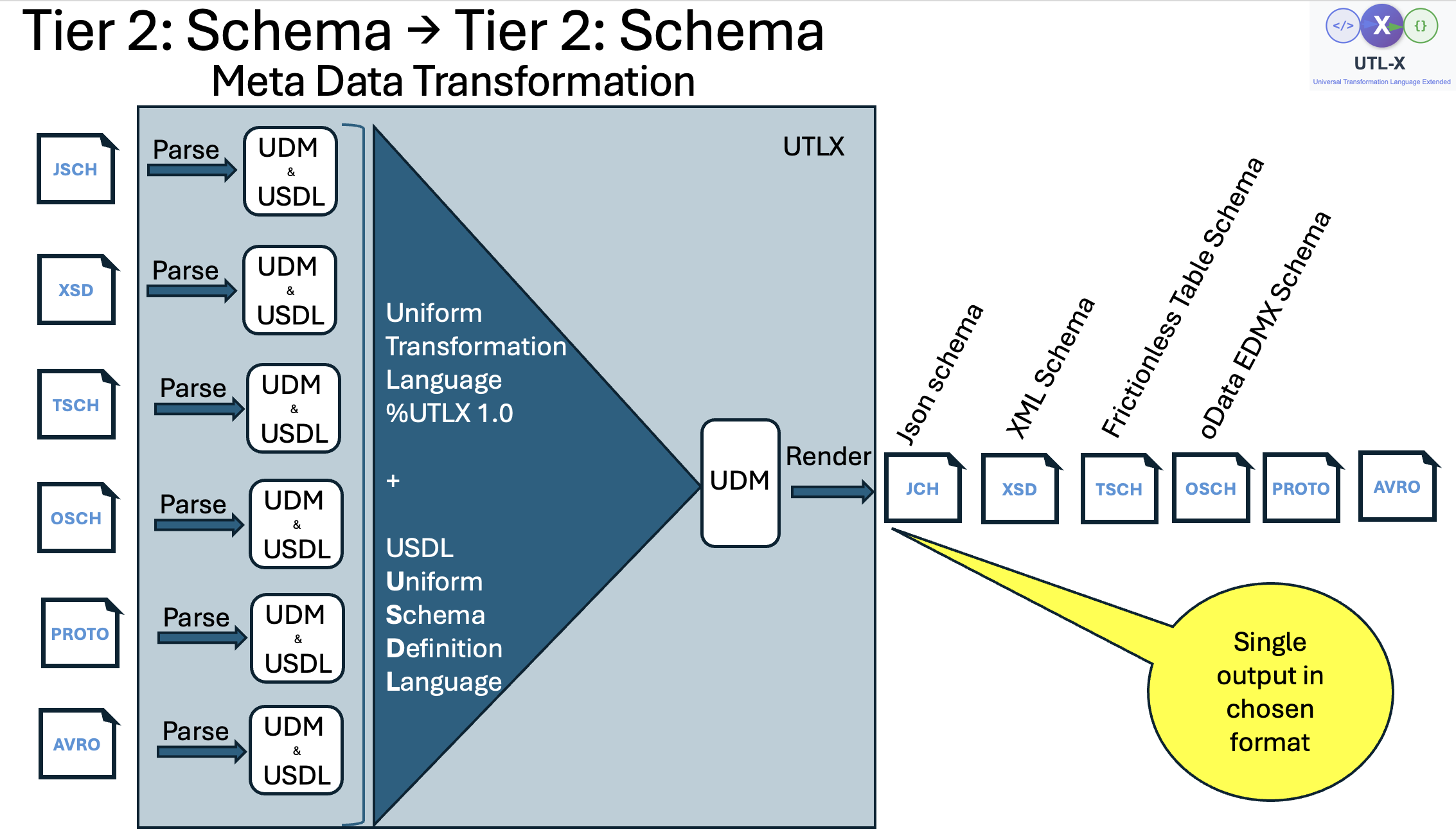
Tier 2 schema transformation — schema formats (JSON Schema, XSD, Table Schema, OData Schema, Protobuf, Avro) are parsed into UDM + USDL. The transformation can convert between any schema format pair.
Schema-to-schema conversion (e.g., input xsd / output jsch) works because USDL normalizes all schema concepts — types, fields, constraints — into a common vocabulary, just as UDM normalizes all data formats into a common tree.
Combined Transformations: Tier 1 + Tier 2
In some scenarios, a transformation receives both instance data (Tier 1) and schema metadata (Tier 2) as inputs. For example, a multi-input transformation might read a JSON message alongside its JSON Schema to produce validated, enriched output — or the output itself might be a schema format.
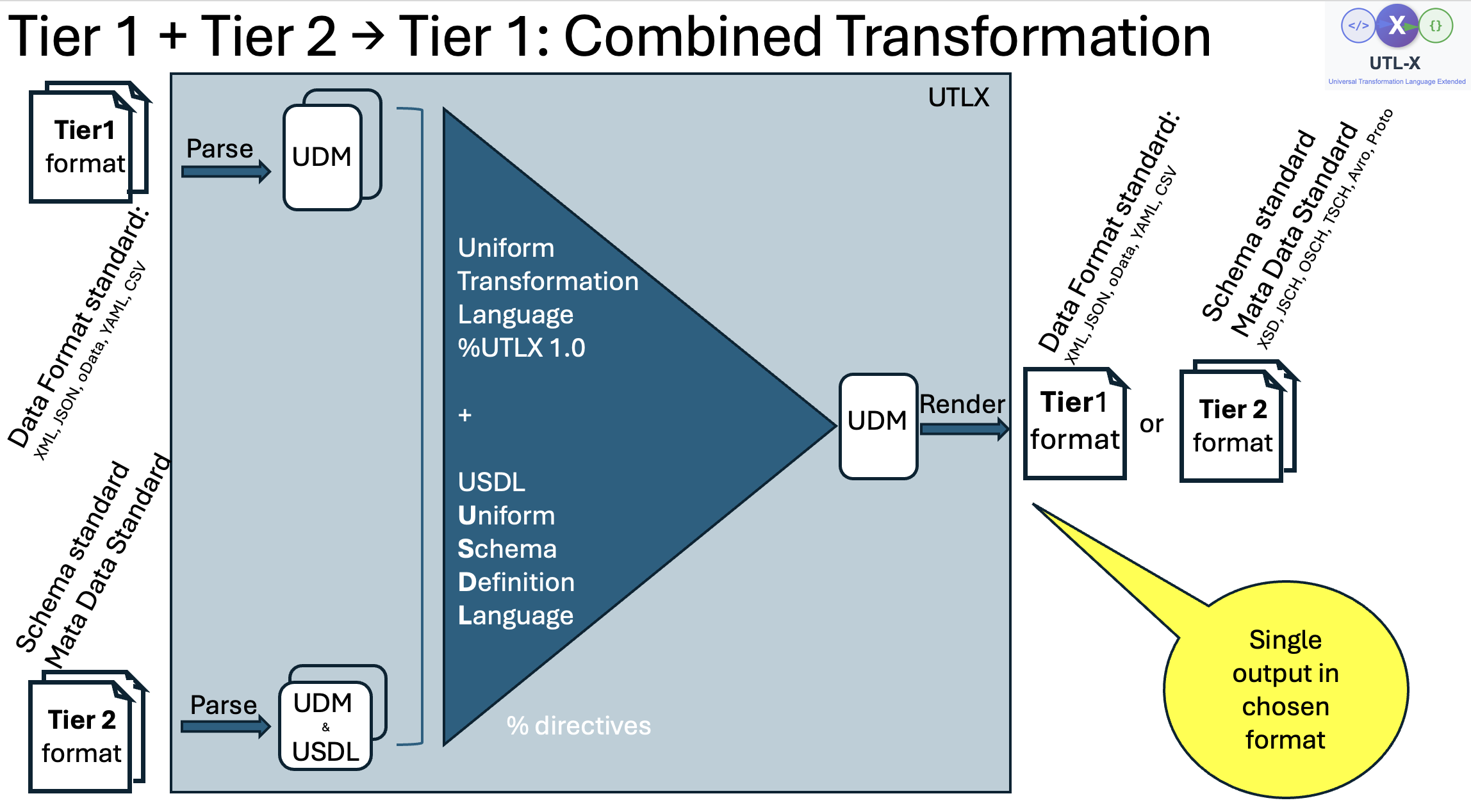
Combined transformation — Tier 1 instance data and Tier 2 schema metadata are parsed into UDM (with USDL for Tier 2). The output can be either a Tier 1 data format or a Tier 2 schema format.
This flexibility means UTL-X handles not just data transformation but also schema generation (CSV metadata → XSD), schema inspection (XSD → JSON report), and data-plus-schema pipelines — all using the same language and the same UDM foundation.
When UDM Matters
Most of the time, you don't think about UDM — you just write $input.name and it works. UDM matters when:
You're debugging unexpected behavior (especially XML attributes and _text)
You're working with flat/relational data (IDoc segments, CSV with foreign keys)
You're optimizing memory usage (UDM expansion factors — see Chapter 37)
You're working with the COMPILED strategy (which generates bytecode against UDM types)
You're writing a wrapper library (which serializes UDM to/from protobuf)
You're contributing to UTL-X itself (all core logic operates on UDM)
For day-to-day transformation development, UDM is invisible — which is exactly the point. It does its job and gets out of the way.